
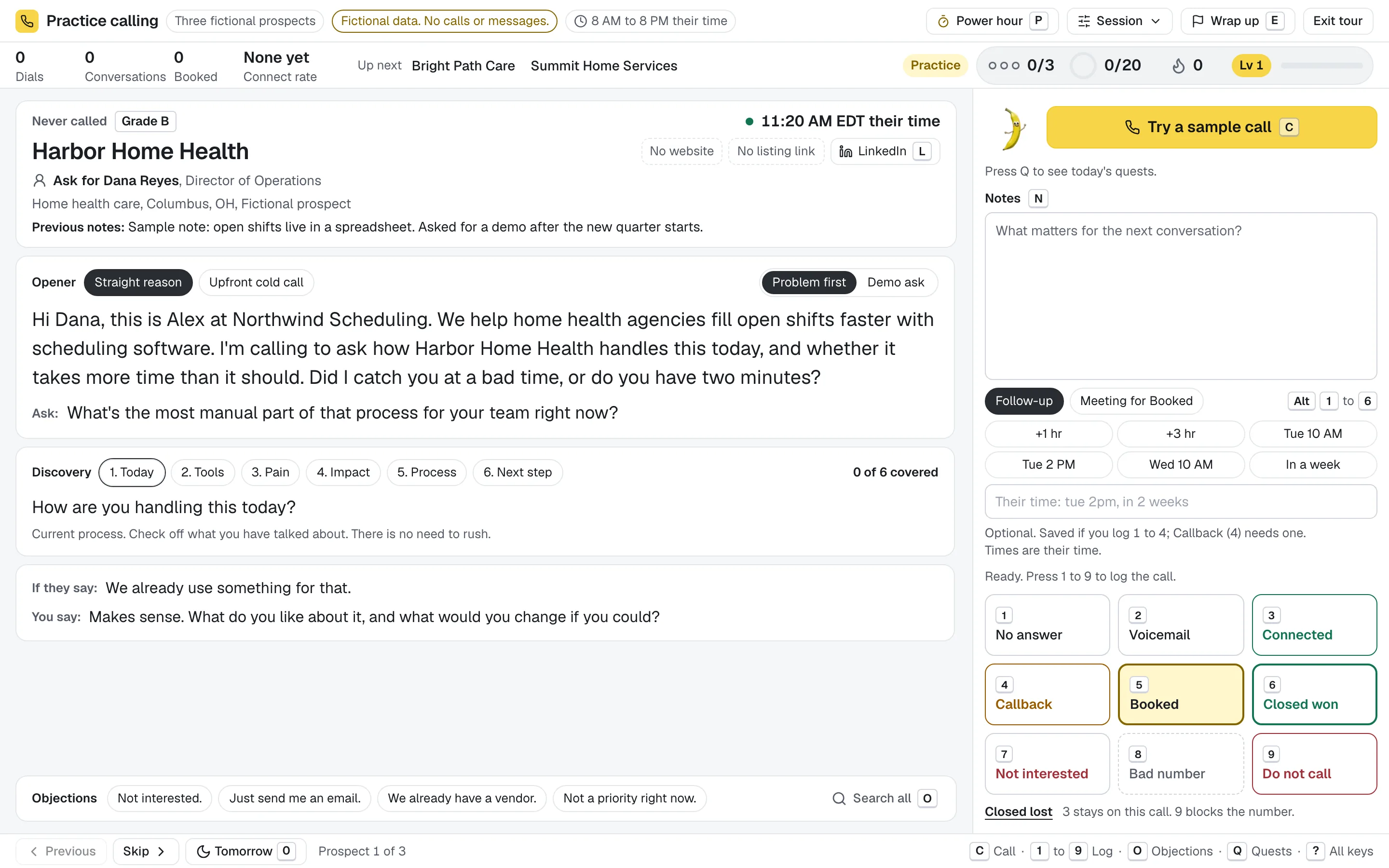
One key per outcome
Press 1 to 9 to log the call. The save runs in the background and the next prospect is already on screen.
Log the outcome with one key. The next prospect is already on screen. The list, the opener, the call and the next step sit on one screen, with calling hours and attempt caps built in.
14 days free, no card to start. Or try the console with fictional prospects.
Who to ask for, your opener, the next discovery question, the reply to the objection you just heard, your notes and nine outcome keys. Nothing to open, nothing to switch to.
The rules a calling team needs are part of the queue, not a policy document. Each one is a default you can adjust.
Press 1 to 9 to log the call. The save runs in the background and the next prospect is already on screen.
Calls stay inside each prospect's local hours, 8 AM to 8 PM by default, worked out from their time zone.
No number is tried more than three times in 24 hours. No answers come back after three days, up to five tries. All adjustable.
Press 9 and that number is never queued again in your workspace.
Registry checks stay with you; the do not call list is your workspace's own.
Pick what you sell and to whom. Openers, discovery questions and objection replies are written for it, then filled with each prospect's name, company and title.
Book demos with operations and department leads, with openers written from your product.
Ask office managers about downtime and security, then offer a walkthrough.
Pitch websites or Google Ads to local businesses, with openers for 18 local trades.
Reach hiring managers about hard to fill roles and the candidates you have ready.
Find the renewal date and offer a second look before it comes up.
Offer facilities managers a walkthrough and learn when the current contract ends.
Something else? Write your own offer and audience, and the lines follow.
Pro is $500 a month with 3 callers included, no seat minimum and no annual contract. A 45 minute setup session with us is part of it.
Decide who to call before the session, then keep your attention on the conversation.
Import or narrow your prospects, choose who to work and open that focused list in the console.
Prospect queueThe person to ask for, your opener, notes and outcome keys, all in one keyboard-first console.
Call workspaceSet a callback or meeting time while the conversation is fresh. Return with the notes still attached.
Follow-upsProspecting is a grind. Banana turns a good calling day into a game you can win, and every point comes from your real calls.
Fill your goal ring with counted dials and keep your calling streak going.
Three conversations in a row lights up the deck. Five is on fire.
Three small goals a day, sized to how you actually call.
A timer and a scoreboard for one focused block of calls.
See who is on top this week. Reps can hide themselves from teammates.
Banana Buddy rings, talks and celebrates when you book a meeting.
Levels, badges and a trophy case keep score. Motion and sound can be turned down or off, and nothing here changes what gets saved.
Import CSV files exported from Apollo, HubSpot and ZoomInfo, or from Sales Navigator list tools. Banana reads the columns it knows and shows you the mapping before anything is saved.
The useful details, without a sales call. Pricing questions have their own page.
The calling workspace for small B2B sales teams. Plan who to call, work the list from one screen with the keyboard, and keep notes, outcomes and follow-ups with each prospect.
Small sales teams who prospect by phone: SaaS and software, IT and managed services, agencies, staffing and recruiting, insurance and financial services, and commercial services. Tell Banana what you sell and to whom, and your openers, discovery questions and objection replies follow.
No. You see the prospect and your opener first, then start each call yourself with one key or click. You use your own phone: the Banana Dialer Companion for Chrome fills the number in your Google Voice tab and you press Call, or dial from any phone.
Yes. Import CSV files exported from Apollo, HubSpot and ZoomInfo, or from Sales Navigator list tools, with a preview before anything is saved. Names, job titles and LinkedIn links come along, and the direct line is dialed first. There is no direct integration: you export a CSV and upload it.
No. Pull local businesses from the built-in business directory, or import your own prospects, and start calling. Google Places discovery, AI on Starter and messaging use your own provider accounts when you choose to connect them.
Yes. Try the console with a fictional software seller and fictional prospects. Practice notes, outcomes and moving through a list without an account. It places no calls and saves nothing.
Banana Dialer is made by Modern Apex Strategies. We built it for our own calling first.
Every workspace starts with a 14 day free trial, and no card is needed to start. An owner or admin subscribes by card from Billing in the workspace, through Stripe. Subscribe before the trial ends and the remaining trial days carry over, so the card is first charged when the trial would have ended. Plans renew monthly or yearly, and you can add callers, see invoices or cancel from Billing at any time. Prices are in US dollars, before tax.
No card to start. Bring a list, or pull one from the business directory, and make your first call today.
Not ready? Try the console with fictional prospects, no signup.